__ __ __ __ _____ _ _ _____ _ _ _
| \/ | \ \ / / | __ \ (_) | | / ____| | | | |
| \ / |_ __\ V / | |__) | __ ___ ____ _| |_ ___ | (___ | |__ ___| | |
| |\/| | '__|> < | ___/ '__| \ \ / / _` | __/ _ \ \___ \| '_ \ / _ \ | |
| | | | |_ / . \ | | | | | |\ V / (_| | || __/ ____) | | | | __/ | |
|_| |_|_(_)_/ \_\ |_| |_| |_| \_/ \__,_|\__\___| |_____/|_| |_|\___V 2.1
if you need WebShell for Seo everyday contact me on Telegram
Telegram Address : @jackleet
For_More_Tools:
# Provision CLOS fabric using the Ansible collection for Dell EMC OS9
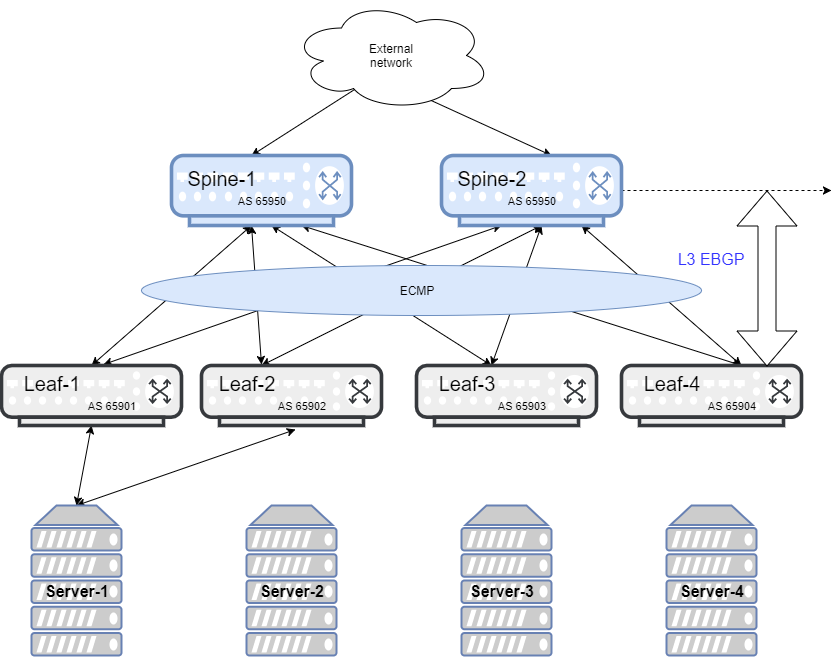
This example describes how to use Ansible to build a CLOS fabric with a Dell EMC PowerSwitch platform running Dell EMC OS9 device. The sample topology is a two-tier CLOS fabric with two spines and four leaves connected as mesh. eBGP is running between the two tiers. All switches in spine have the same AS number, and each leaf switch has a unique AS number. All AS numbers used are private.
For application load-balancing purposes, the same prefix is advertised from multiple leaf switches and uses _BGP multipath relax_ feature.
## Create a simple Ansible playbook
**1**. Create an inventory file called `inventory.yaml`, then specify the device IP address.
**2**. Create a group variable file called `group_vars/all`, then define credentials and SNMP variables.
**3**. Create a group variable file called `group_vars/spine.yaml`, then define credentials, hostname, and BGP neighbors of spine group.
**4**. Create a host variable file called `host_vars/spine1.yaml`, then define the host, credentials, and transport.
**5**. Create a host variable file called `host_vars/spine2.yaml`, then define the host, credentials, and transport.
**6**. Create a host variable file called `host_vars/leaf1.yaml`, then define the host, credentials, and transport.
**7**. Create a host variable file called `host_vars/leaf2.yaml`, then define the host, credentials, and transport.
**8**. Create a host variable file called `host_vars/leaf3.yaml`, then define the host, credentials, and transport.
**9**. Create a host variable file called `host_vars/leaf4.yaml`, then define the host, credentials, and transport.
**10**. Create a playbook called `datacenter.yaml`.
**11**. Run the playbook.
ansible-playbook -i inventory.yaml datacenter.yaml
(c) 2017-2020 Dell Inc. or its subsidiaries. All rights reserved.